
How to Get the Green Tick on WhatsApp Business: A Step-by-Step Guide
Last updated: October 2026
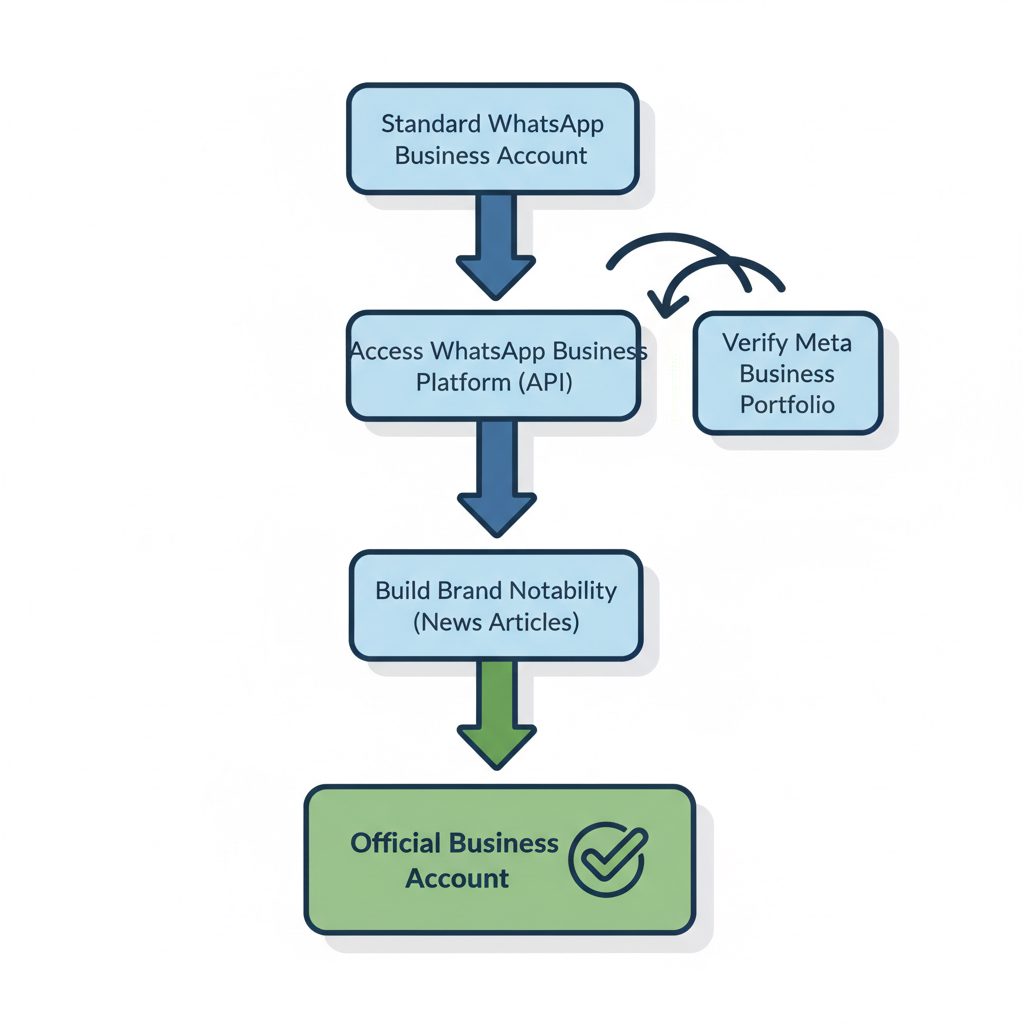
Learning how to get the green tick on WhatsApp Business involves two main phases: setting up a WhatsApp Business Platform (API) account and then proving your brand's 'notability' to Meta. The green tick signifies an Official Business Account, a status reserved for credible, well-known brands.
An Official Business Account is a profile verified by Meta, identified by a green checkmark badge next to the business’s name, confirming its authenticity and association with a well-known brand. This verification is free; you do not pay WhatsApp for the badge.
Instead of a fee, approval depends on meeting a specific set of criteria related to your business's public profile. This guide explains the eight required steps, from setting up the correct accounts to building the notability evidence Meta's reviewers require. Following this process is the only reliable path to securing the green tick.
What Are the 8 Steps for WhatsApp Verification?
Securing the green tick, which creates an "Official Business Account," involves several stages. The process requires a technical setup through the WhatsApp Business Platform and evidence that your brand is well-known. These steps are based on Meta's official documentation and common applicant challenges.
| Step | Focus | Effort / Cost | Key Consideration |
|---|---|---|---|
| 1. Understand Account Types | Foundational Knowledge | Low / Free | Determines if your business is eligible to apply. |
| 2. Get a WhatsApp API Number | Technical Prerequisite | Medium / Varies by Provider | Cannot apply without the Business Platform (API). |
| 3. Verify Meta Business Portfolio | Mandatory Security | Low / Free | Confirms your business's legal identity. |
| 4. Enable Two-Factor Auth (2FA) | Account Security | Low / Free | Meta requires this before you can apply. |
| 5. Build Brand Notability | The Hardest Part | High / Variable Cost | This is where most applications fail. |
| 6. Submit the Application | The Formal Request | Low / Free | Done within the WhatsApp Manager interface. |
| 7. Handle the Decision | Post-Application | Low / Free | Know how to appeal a rejection correctly. |
| 8. Maintain Compliance | Long-Term | Ongoing / Free | The badge can be revoked for policy violations. |
1. Understand the Account Types: Business vs. Official Business
First, you must understand the two types of WhatsApp Business accounts. This distinction is the primary source of confusion and failed applications.
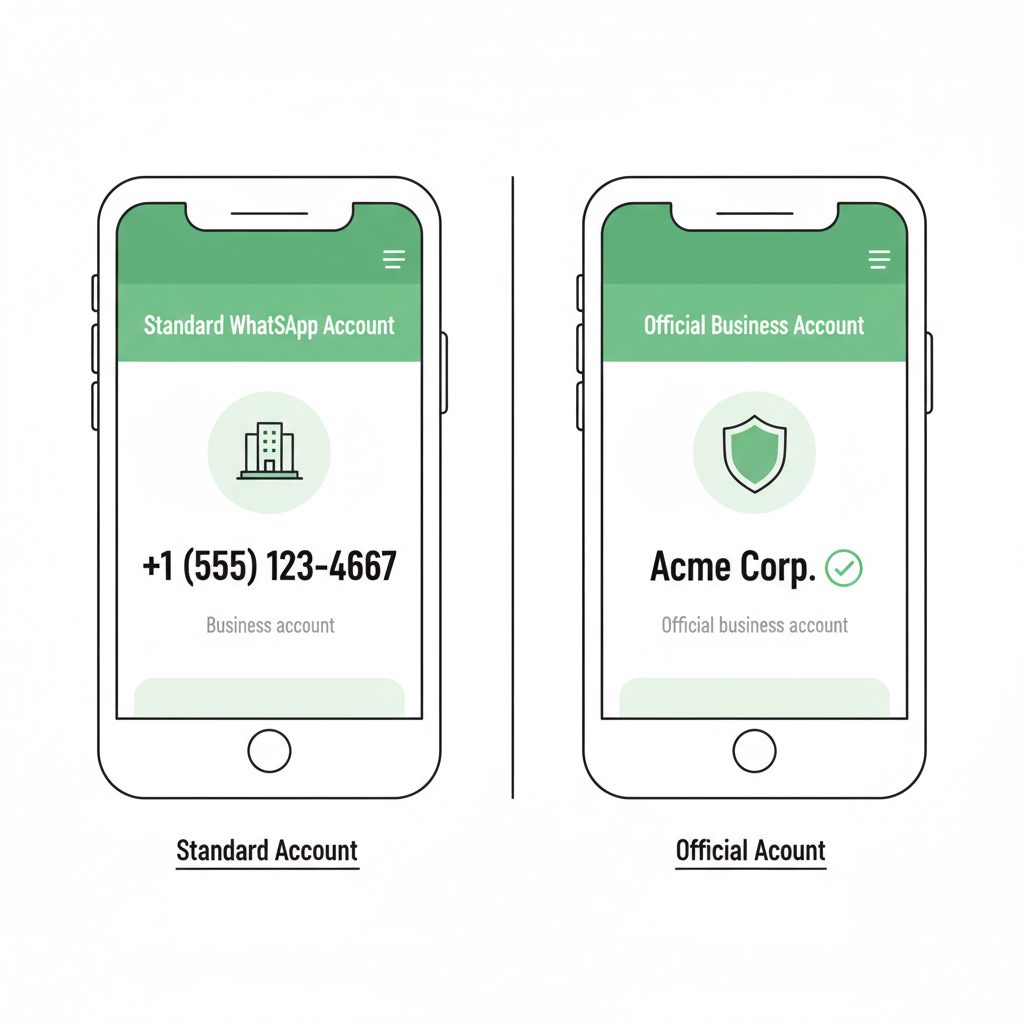
- Business Account: This is the default status for any account on the WhatsApp Business Platform or the free WhatsApp Business app. It displays the phone number in the chat list. The business name appears only in the contact view in a smaller font. Any business can have this account type.
- Official Business Account: This account has the green tick. The checkmark appears next to the business's display name in the chat list, chat screens, and contact view. The display name is visible even if the user has not saved the number. Meta grants this status; it cannot be purchased.
Your goal is to convert a standard Business Account on the API platform into an Official Business Account. You cannot apply for the green tick using the standard, free WhatsApp Business app, which is separate from the massive user base of the main app.
2. Secure a WhatsApp Business Platform (API) Number
To be eligible for a green tick, your business must use the WhatsApp Business Platform, also known as the WhatsApp API. This platform differs from the free app available in app stores. The API is designed for medium to large businesses to integrate WhatsApp messaging into their systems, often with help from a third-party provider.
To access the API, you generally work with a WhatsApp Business Solution Provider (BSP). These are Meta-vetted companies that provide the software to manage high-volume messaging. When choosing a BSP, consider their fee structure and experience. While pricing varies, Meta provides the first 1,000 service conversations per month for free for all accounts. After that, you pay per conversation, with rates varying by country.
3. Verify Your Meta Business Portfolio (Manager)
Before you can apply for verification, Meta must confirm your business is a legitimate legal entity. You complete this step through the Meta Business Portfolio (formerly Facebook Business Manager). If you already run ads on Facebook or Instagram, your business may already be verified.
Verification requires submitting official documents that prove your business's legal name and address. According to Meta's documentation, accepted documents include:
- A business license or certificate of incorporation.
- A utility bill or bank statement with the business name and address.
- Articles of incorporation.
Navigate to the Security Center in your Meta Business Portfolio and follow the prompts for Business Verification. The process can take from a few days to a couple of weeks.
4. Enable Two-Factor Authentication (2FA)
Meta requires you to enable two-factor authentication (2FA) for the Business Portfolio account that manages the WhatsApp Business Account. This security measure is a mandatory step that helps prevent unauthorized access.
To enable it, the admin of the Business Portfolio must go to the Security Center. There, they can set up 2FA, which requires a code from an authentication app or an SMS message upon login. The option to apply for an Official Business Account will not appear until 2FA is active.
How Do You Prove Your Brand's Notability?
Building notability is the most subjective and challenging step. Simply being a registered business is not enough.
You need to gather evidence of this notability for your application. The best evidence includes 3-5 recent links to unpaid articles about your business from major, independent media outlets. National news organizations are more effective than local papers or trade blogs.
Other signals of notability can include:
- A Wikipedia page about your company that follows Wikipedia's notability guidelines.
- Stock market listings if your company is public.
- Significant follower counts on other social platforms, though this does not replace the need for news articles.
Your brand must be prominent enough that a journalist would write about it without being paid. This is the standard Meta's reviewers use.
How does Meta decide who gets the green tick?
Meta's decision process for the WhatsApp green tick is based on a single principle: notability. The review team manually assesses if a brand has a significant, independent public presence. They do not evaluate your business size or revenue.
The review team checks for organic media coverage from reputable sources to confirm your brand is widely recognized.
This is why having a registered company is not sufficient. Think of it as an external audit of your brand's fame. If a random person is unlikely to have heard of your business, you are unlikely to be approved.
6. Submit the Application via WhatsApp Manager
Once you meet all the prerequisites, you can formally submit the request.
- Navigate to WhatsApp Manager: Go to your Meta Business Portfolio and select WhatsApp Manager.
- Select the Account: Choose the WhatsApp Business Account you want to verify.
- Find the Profile Section: In the left-hand menu, navigate to the phone number's profile section.
- Request Official Business Account: Click the "Request Official Business Account" option to begin.
- Provide Notability Links: You will be asked to provide up to five links to news articles or other public references that support your notability claim. Choose your strongest, most independent sources.
After submitting, the review process typically takes a few business days but can extend to a week or more.
Where DarkSMM's Service Fits
Navigating Meta's notability requirements is the most common point of failure. Many legitimate businesses lack the specific type of press coverage Meta demands or don't know how to present their case effectively. This is where a guided service can be a practical tool.
The WhatsApp Business Verification service at DarkSMM assists with this process. Our team evaluates your existing brand presence and helps compile the necessary documentation and notability evidence required by Meta. We manage the application submission through a partnered BSP and handle the communication. This service is for businesses that are likely eligible but need expert assistance in preparing and submitting their application. It does not guarantee approval, as the final decision always rests with Meta, but it structures your application to meet the known criteria, maximizing your chances.
7. Handle the Decision: Approval or Rejection
You will receive a notification in your Business Portfolio about the decision.
- If Approved: The green tick will automatically appear next to your display name within a few hours or days. No further action is needed.
8. Maintain Compliance After Approval
Receiving the green tick is not the end of the process. Meta can revoke the Official Business Account status. To maintain it, you must adhere to WhatsApp's official policies, including the WhatsApp Business Policy. Violations that can lead to revocation include:
- Sending spam or unsolicited marketing messages.
- Misleading users about the nature of your business.
- Failing to maintain an active, high-quality customer service experience.
- Changing your business name to something that no longer reflects the verified entity.
Treat the green tick as a trust signal that you must continuously earn through good practice.
Checklist for Applying
Before you submit your application, run through this final checklist:
- Confirm you are using the WhatsApp Business Platform (API), not the free app.
- Verify your Meta Business Portfolio is complete and approved.
- Enable Two-Factor Authentication for your Business Portfolio admin.
- Gather 3-5 links to strong, independent news articles about your brand.
- Check that your display name strictly adheres to WhatsApp's naming guidelines.
- Wait 30 days since your last rejection, if applicable.
Completing these steps gives your application the highest probability of success. For those ready to proceed with expert help, the WhatsApp Business Verification service can streamline the process.
Frequently asked questions
How much does it cost to get a green tick on WhatsApp?
WhatsApp does not charge a fee for the green tick itself; the verification is free. However, there are associated costs. You must use the WhatsApp Business Platform (API), which is typically accessed through a Business Solution Provider (BSP) with its own fees. Meta does provide the first 1,000 service conversations per month for free. The main indirect cost is in building the brand notability (e.g., PR efforts) that Meta requires for approval.
Can any business get the WhatsApp green tick?
No, most businesses are not eligible. The green tick is reserved for "Official Business Accounts," which Meta defines as notable, well-known brands. Small businesses, local shops, and new companies are unlikely to meet the notability criteria, which require significant organic media coverage and public recognition.
What happens if my green tick application is rejected?
If your application is rejected, you can re-apply after 30 days. A rejection is not permanent. Use the 30-day waiting period to improve your brand's notability by securing more press coverage or improving your online presence. Do not re-apply immediately with the same information, as it will likely be rejected again.
How long does WhatsApp verification take?
The review process by Meta typically takes between 2 to 7 business days after you submit the application. However, this timeline can vary depending on the volume of requests and the complexity of your case. You will receive a notification in your Meta Business Manager once a decision has been made.
Is the green tick permanent?
No, the green tick can be revoked. If your business violates WhatsApp's policies, such as the WhatsApp Business Policy, Meta reserves the right to remove your Official Business Account status and the green tick.
Do I need a Facebook or Instagram page to get verified on WhatsApp?
While not an explicit requirement, having an established and verified presence on other Meta platforms like Facebook and Instagram can support your notability case. It helps create a more complete picture of your brand's authenticity and public recognition for the review team, but it will not replace the core requirement of independent news coverage.