
TikTok Business Verification: Business Account vs. Verified Badge
Last updated: October 2026
TikTok business verification involves two separate goals: switching to a free Business Account for commercial tools, or earning the blue Verified Badge for public notability. Failing to distinguish between these two paths is a common reason for application rejection. A Business Account is a free upgrade for any brand, while the Verified Badge is an exclusive marker of authenticity.
TikTok Business Verification: A term for two distinct platform processes. The first is activating a free Business Account to access analytics and ad tools. The second is earning the blue Verified Badge, which signals that TikTok has confirmed an account's authenticity and public notability.
This guide clarifies the requirements, documents, and steps for both paths. We cover the free process of setting up a Business Account and the more complex criteria for earning the blue checkmark for your company.
Key Takeaways
- Distinguish the Two Verifications: A "Business Account" is a free account type with commercial tools. A "Verified Badge" (blue check) signals notability and is much harder to get.
- Prepare Your Documents: For running ads or resolving account issues, TikTok requires official business documents like a tax ID or certificate of incorporation.
- Build Public Notability for a Badge: The blue check is awarded based on being featured in multiple, independent, and reputable news sources. Paid or promotional content does not count.
- Use the Right Music: Business Accounts are restricted to TikTok's Commercial Music Library to avoid copyright issues, a significant limitation for trend-based content.
- Follow a Clear Process: Switching to a Business Account is simple and done within the app's settings. Applying for a Verified Badge is a separate process demanding external proof of prominence.
Business Account vs. Verified Badge: What's the Difference?
Many users confuse having a Business Account with having a verified blue check. However, they serve different functions and have entirely different requirements. A Business Account is a tool for commerce, while a Verified Badge is a signal of public interest.
TikTok Business Account is an account type that provides access to commercial features. It is free and available to any user who wants to use TikTok for professional purposes. Its primary benefits include performance analytics, the Business Creative Hub, and the ability to run ads. For example, a 2021 study by the firm Material, commissioned by TikTok, found that 67% of users felt inspired to shop even when they weren't planning to, showing the platform's commercial power. The main trade-off is that Business Accounts have restricted access to the Commercial Music Library, which contains royalty-free tracks but lacks the trending sounds that drive viral content.
In contrast, the Verified Badge is a blue checkmark appearing next to a username. According to TikTok's official support page, this badge signifies that the platform has confirmed the account's authenticity. It shows the account belongs to the notable public figure, celebrity, or brand it represents.
The badge does not grant access to special features. Instead, it provides immense credibility and helps the account stand out. With over 1.56 billion monthly active users globally as of early 2024, a verified badge helps notable accounts distinguish themselves from impersonators. Verification is not tied to account type; a Personal, Creator, or Business account can be verified.
| Feature | Business Account | Verified Badge (Blue Check) |
|---|---|---|
| Best for | Brands focused on ads and performance tracking | Public figures and notable brands needing to prove authenticity |
| Purpose | Access commercial tools, analytics, and ads | Signal authenticity and public notability |
| Cost | Free to switch | Free if earned; submission services exist |
| Eligibility | Any user or business | Accounts with significant press coverage |
| Primary Benefit | Commercial features and analytics | Trust, credibility, and brand protection |
| Music Access | Restricted to Commercial Music Library | Full access to general sounds and music library |
| Application | Simple in-app switch | Requires proof of notability (e.g., news articles) |
How to Set Up a TikTok Business Account (The Free Method)
Switching your existing profile to a Business Account is a straightforward process handled entirely within the TikTok app. This change gives you access to a set of tools designed to help you track performance and promote your brand. The main reason to switch is to operate professionally on the platform, with access to metrics that inform your content strategy and the ability to run ads.
Before switching, however, consider the music library restriction. For content strategies that rely heavily on using popular, trending audio, a Creator Account is often a better choice. It retains access to the full sound library while still offering some analytics.
Step-by-Step Process to Switch
- Open Your Profile: Navigate to your profile page in the TikTok app.
- Access Settings: Tap the three horizontal lines in the top-right corner to open the "Settings and privacy" menu.
- Go to Account: Tap on "Account" at the top of the menu.
- Initiate the Switch: Select "Switch to Business Account" and follow the on-screen prompts.
- Choose a Category: TikTok will ask you to select a category that best describes your business (e.g., Retail, Entertainment, Services). This helps TikTok tailor content and trends for you.
- Add Business Information: You will have the option to add a business email and a link to your website, which will appear on your profile.
What Documents Are Needed for TikTok Business Verification?
While switching to a Business Account is simple, TikTok may later require you to verify your business's legal identity. This step, properly called Business Verification in TikTok's business platform, is typically triggered when you try to run ads, set up a TikTok Shop, or if your account is flagged for review. This process is about proving your business is a real legal entity, primarily for regulatory and security reasons.
According to TikTok's official advertising policies, you must provide a valid document to verify your business. The specific documents accepted vary by country.
Commonly accepted documents include:
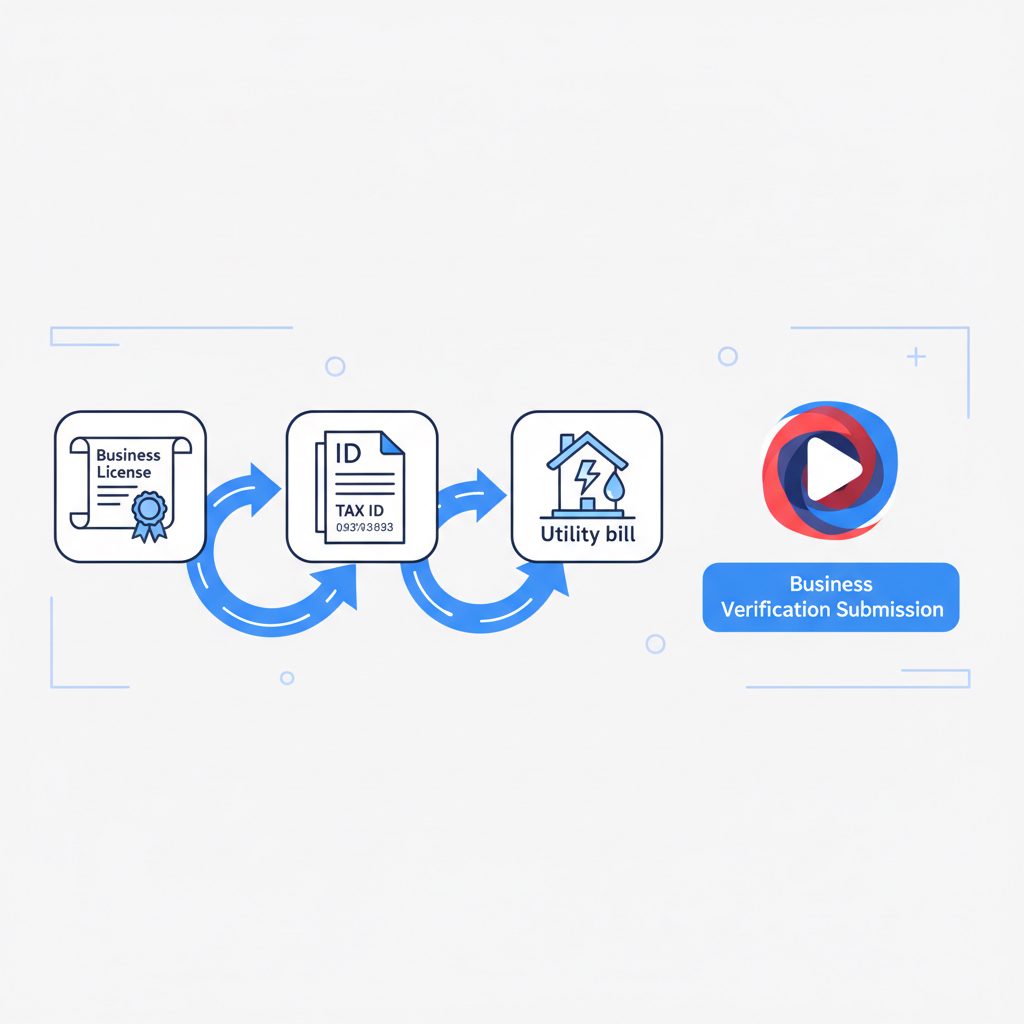
- Certificate of Incorporation
- Business License
- Taxpayer Registration Certificate (e.g., IRS SS-4 for U.S. businesses)
- Official company bank statements
- Utility bills registered to the company address
To complete your business verification, you will need to submit an acceptable document that we can use to verify your business as an organization. The document must clearly show your business name and address.
Ensure the business name and address on the document exactly match the information you provide in your TikTok Ads Manager or Business Center. Mismatches are a frequent cause of rejection.
How to Get a Verified Badge (Blue Check) for Your Business
Obtaining the blue check is a separate and far more challenging goal. This type of verification is not about your legal status but about your public prominence. TikTok grants verified badges to help users make informed choices about the accounts they follow. It signals that an account is authentic and notable.
TikTok's Official Criteria for Verification
TikTok evaluates accounts against several criteria. While the exact formula is internal, their public guidelines emphasize these points:
- Active and Authentic: The account must have been active within the last six months and represent a real person or entity.
- Complete Profile: It must have a bio, profile name, profile photo, and at least one video.
- Secure: The account must have two-factor authentication with a verified email.
- Notable: This is the most critical criterion. The account must be featured in multiple, credible news sources. TikTok explicitly states that press releases and sponsored or paid media do not count. The platform is looking for organic media coverage as a signal of public interest.
This notability standard is common across major platforms. The process and requirements for getting a blue check on TikTok are similar to the challenges of how to get verification on Instagram, where press is paramount.
The "Notability" Hurdle: What It Really Means
Your business must be newsworthy on its own merits. This means journalists, not marketers, have decided to write about it. The credibility of the source matters immensely. For instance, a feature in a national newspaper carries far more weight than a mention on a local blog. This is especially true as public trust in media varies. For example, a 2023 [Pew Research Center survey found that only 32% of U.S.
Before seeking verification, you should have a portfolio of at least 5-10 strong, independent press mentions. Without this evidence, an application is almost certain to fail.
Where DarkSMM Fits: The Path to a Verified Badge
To be clear about our role, DarkSMM does not offer services for switching to a TikTok Business Account or for the ad-related business document verification. Users must complete these processes themselves using their own legal documents through TikTok's official channels.
Our service focuses exclusively on the second, more difficult goal: obtaining the Verified Badge (blue check). The TikTok Verification Badge service, priced at $900, is a case management and submission service. It is designed for businesses, public figures, and creators who already meet the public recognition requirements but need expert assistance with the application process.
This service does not generate notability. Instead, our team assesses your existing press portfolio, prepares the application, and submits it through agency-level support portals that can provide a more direct line for review than public forms. This service is for clients who have done the hard work of becoming notable and want to maximize their chances of a successful review. If an account lacks sufficient press coverage, this service is not a suitable solution.
Why Was My TikTok Verification Application Rejected?
Understanding why verification attempts fail can help you prepare a stronger case. The reasons differ depending on whether you are dealing with business document verification or a blue check application.
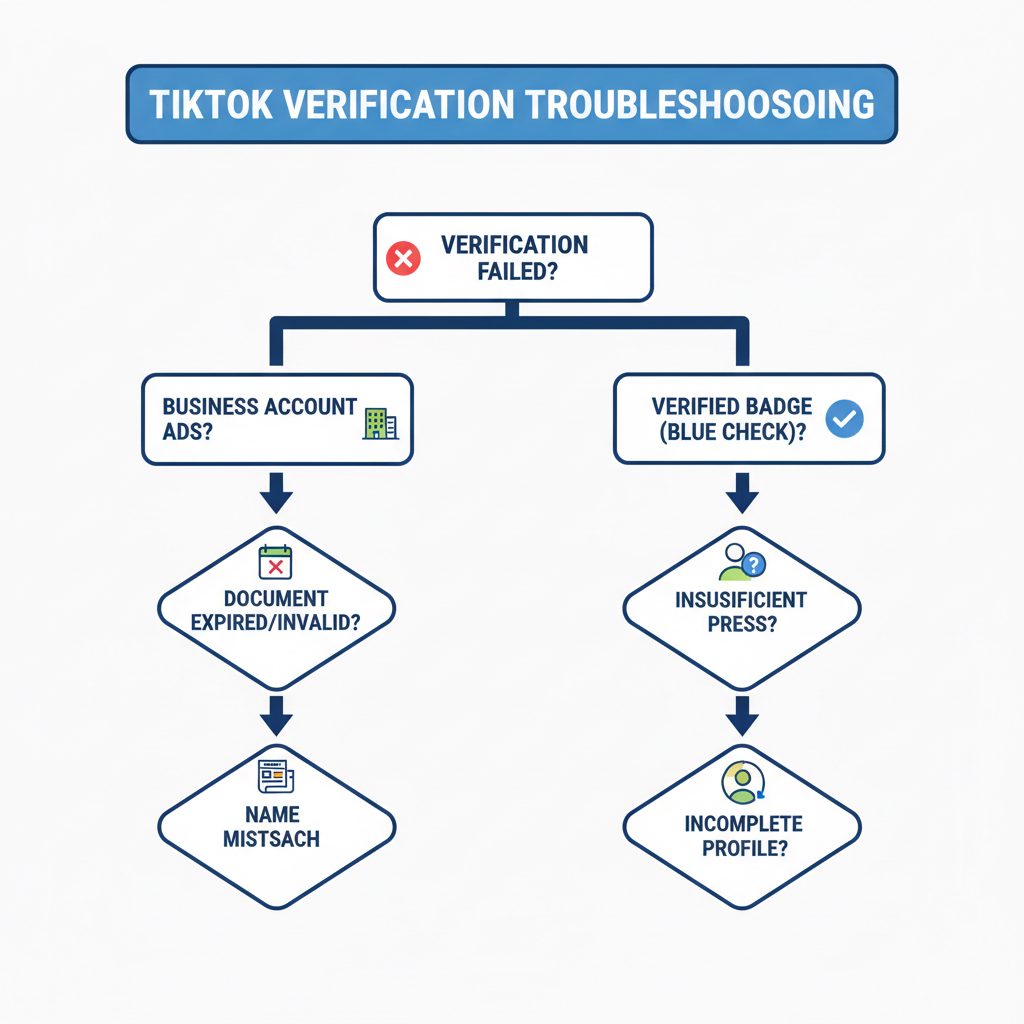
For Business Account Ad Verification:
- Document Mismatch: The business name or address on your submitted license does not exactly match the details in your TikTok Ads account. To fix this, update your account details or use a different document.
- Expired or Invalid Documents: Submitting an out-of-date business license or an unsupported file type will lead to instant rejection. Therefore, always use current, official PDFs or high-quality scans.
- Linking to the Wrong Account: If you use multiple Business Centers, ensure you are submitting documents under the one that will actually run the ads. TikTok's systems are siloed in this regard.
For Verified Badge (Blue Check) Applications:
- Insufficient Notability: This is the leading cause of rejection. You lack sufficient coverage in reputable, independent news outlets. The only fix is to invest in public relations to build your brand's profile organically.
- Inauthentic Activity: Evidence of buying followers or using engagement pods can disqualify an account. TikTok's review team checks for authentic growth patterns.
- Incomplete Profile: An unprofessional or empty profile signals a lack of seriousness. Ensure your bio is clear, your website link works, and you are posting content regularly.
What Should I Do Before Applying for Verification?
Before starting any verification process on TikTok, run through this checklist to ensure you are prepared and pursuing the correct goal.
- Define Your Objective: Clarify if you need a Business Account for its tools or a Verified Badge for notability. Do not confuse the two.
- Gather Business Documents: If your goal involves running ads, locate your official business license, tax ID, or certificate of incorporation. Ensure they are current and legible.
- Audit Your Public Profile: For a Verified Badge, compile links to at least five high-quality news articles about your brand. Be honest about whether they are truly independent press or just paid placements.
- Optimize Your TikTok Profile: Make sure your username, profile picture, and bio are professional, complete, and consistent with your other social media accounts.
- Secure Your Account: Enable two-factor authentication (2FA) with a verified email. This is a mandatory requirement for blue-check verification.
- Check Account Standing: Review your account for any recent Community Guideline violations. TikTok is unlikely to approve an account in bad standing for verification.
Frequently Asked Questions
What is a TikTok business account?
A TikTok Business Account is a free account type that gives users access to commercial tools like performance analytics, the Business Creative Hub, and the ability to run ads. It is designed for brands and companies using the platform for marketing. The main drawback is its restriction to a limited, royalty-free Commercial Music Library.
How do you get verification on TikTok?
To get a verified blue check on TikTok, your account must be authentic, active, and, most importantly, notable. Notability is proven by being featured in multiple reputable news sources. TikTok reviews applications and grants verification based on the strength of this external validation. It is not something you can simply buy directly from TikTok.
What is TikTok verification?
TikTok verification can mean two things. First is business verification for advertisers, which requires submitting legal documents to prove your company is a legitimate entity. The second, more common meaning is the blue checkmark (Verified Badge), which confirms an account's authenticity and public notability. This badge is reserved for prominent public figures, celebrities, and brands.
What is TikTok age verification?
TikTok age verification is a separate process used to confirm a user's age to control access to certain features, such as direct messaging, going LIVE, or viewing age-restricted content. This is a platform safety measure and is unrelated to business verification or the notability-based blue checkmark.
Why do I get a TikTok verification code text?
You receive a TikTok verification code via text message as part of the platform's security measures, typically during login or when enabling two-factor authentication (2FA). This code confirms you are the legitimate owner of the account and helps prevent unauthorized access. It is not related to the Verified Badge application process.
How do I get a verification TikTok account?
To get a verified TikTok account (with a blue check), you need to demonstrate significant public recognition. This involves building a strong public profile and securing organic media coverage in well-regarded news outlets. Once you have established this notability, you can apply for verification through the app or use a specialized service to manage your submission, such as the TikTok Verification Badge service.